Se connecter
WhatsApp Business utilisant Clientify

8 clics
Switch 345
Hola, ¿cómo podemos ayudarte?
Autre
8 clics
Ward Morton Campbell
Agency / SEO / Design
8 clics
ChatWith.io
upload
Agency / SEO / Design
8 clics
prices
test
Agency / SEO / Design
7 clics
¡Widget Test automated!
sss
7 clics
alfonsoychristian
¡Únete al webinar!
Education
7 clics
freebooking 2 (New)
sr
Agency / SEO / Design
7 clics
alfonsoychristian
¿Cómo puedo ayudarte?
Education
7 clics
free booking test (New)
free booking test
Agency / SEO / Design
7 clics
Booking and buy
Booking and buy
Agency / SEO / Design
7 clics
ChatWith.io
How can I help you?
Agency / SEO / Design
6 clics
¡Widget Test automated! (New)
sss
Précédent
1
…
19
20
21
22
(current)
23
24
25
…
53
Suivant
Ajoutez le widget sur votre site web
1. Copiez ce code
Le code de votre widget
Copier le code
Copié dans le presse-papiers
ou votre numéro de clé (
Learn how to add your Widget to your Wordpress website
)
Copier le numéro de clé
Copié dans le presse-papiers
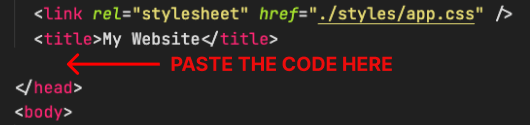
2. Collez le code
Placez le code juste avant la balise </head> dans le HTML de votre site web